Energy Consumption of YouTube Short-Form Video Playback: Auto vs HD720 on Chrome and Firefox
Uddhav Pisharody, Job Stouthart, Vasil Chirov, Georgi Dimitrov, Horia Zaharia.
Group 28.
We investigate the energy consumption of YouTube short-form video playback under controlled conditions. Specifically, we analyze how browser choice (Google Chrome vs Mozilla Firefox) and video quality settings (automatic quality selection vs forced 720p playback) affect energy usage. Using the same YouTube Short video across all experiments, we construct a 2×2 experimental design consisting of Chrome–Auto, Chrome–HD720, Firefox–Auto, and Firefox–HD720 configurations. Energy consumption is measured using EnergiBridge at the CPU package level while automating video playback via Playwright. Each configuration is executed 30 times in randomized order to mitigate system noise.
Energy Consumption of YouTube Short-Form Video Playback
Auto vs HD720 on Chrome and Firefox
Introduction
Why Energy Efficiency in Browsers Matters
The web browser has become one of the most frequently used and long-running applications on modern computing systems. From work and communication to entertainment and education, browsers often remain open for hours at a time, silently consuming energy in the background. As a result, even small inefficiencies at the browser level can accumulate into a significant energy footprint when scaled to millions of users.
Video streaming is one of the most energy-intensive activities performed inside a browser. While users are accustomed to optimizing for visual quality or playback smoothness, the energy cost of these choices remains largely invisible. In particular, short-form video platforms such as YouTube Shorts are consumed repeatedly throughout the day, making them an important yet underexplored contributor to everyday energy usage.
Unlike traditional performance benchmarks, energy efficiency is rarely exposed to users as a decision factor. Choices such as which browser to use or whether to force a higher playback quality are often made without awareness of their potential system-level consequences. Studying these user-facing choices provides insight into how software design and default settings can influence sustainability at scale.
This project investigates whether two everyday software choices: browser selection (Google Chrome vs Mozilla Firefox) and video quality selection (automatic quality vs forced 720p), lead to measurable differences in energy consumption for the same YouTube Short. We focus on short-form content because it represents a bounded, repeatable task that is consumed at a massive scale, making even small per-play differences relevant when aggregated across millions of users.
We evaluate four configurations, each executed 30 times under controlled conditions:
- Chrome–Auto
- Chrome–HD720
- Firefox–Auto
- Firefox–HD720
Why energy (J) instead of power (W)?
Watching a YouTube Short is a bounded interaction. Therefore, total energy (J)—which captures the absolute cost of completing the task—is our primary metric. Two configurations may draw similar instantaneous power (W) but differ substantially in energy if one sustains that load longer or executes unpredictably. Power is analyzed secondarily to explain why energy differences arise.
Experimental Design
Factors and conditions
| Factor | Levels |
|---|---|
| Browser | Chrome, Firefox |
| Video quality | Auto, HD720 |
Each configuration is executed 30 times, with randomized execution order to reduce systematic bias (e.g., thermal or caching effects).
Environment and controls
| Component | Setting |
|---|---|
| OS | Ubuntu 24.04 LTS |
| CPU | Intel Core i7-14650HX |
| RAM | 16 GB |
| GPUs | Intel Raptor Lake UHD + NVIDIA RTX 4060 (Mobile) |
| Power | Plugged into mains |
| Controls | Fixed window size, aligned playback |
| Noise mitigation | Randomized runs + rest interval |
Methodology
Browser and Quality Selection
This study focuses on two widely used desktop browsers: Google Chrome and Mozilla Firefox. While both browsers provide similar user-facing functionality, they rely on different internal architectures for rendering, JavaScript execution, and media playback. Comparing these browsers under identical workloads allows us to observe how implementation-level differences influence energy consumption.
Rather than modifying low-level hardware acceleration flags, we evaluate two user-facing video quality settings: automatic quality selection and forced 720p playback. These settings reflect realistic user behavior and directly influence decoding complexity, buffering behavior, and rendering workload during playback.
YouTube Workload
To ensure a controlled and repeatable workload, we use a single YouTube Short video across all experiments. Short-form content is particularly suitable for energy analysis because it represents a bounded interaction with a well-defined start and end, while still exercising the full browser media pipeline.
Using the same video across all runs eliminates content-related variability and ensures that observed differences are attributable to browser and quality settings rather than video characteristics.
Playback Control and Alignment
Video playback is fully automated and aligned to the actual playback window, rather than page load or script execution. Energy measurement begins only after playback is confirmed and terminates before end-of-video elements or autoplay behavior can introduce additional workload. This alignment ensures that measurements reflect the energy cost of video playback itself.
Each configuration is executed 30 times, with randomized run order and a fixed rest period between runs to mitigate thermal and scheduling effects. This repetition allows us to capture both average behavior and variability across executions.
Automation and Replication Pipeline
Manually replaying videos, clicking through consent dialogs, or starting and stopping measurements by hand would introduce significant noise and make results difficult to reproduce. To avoid this, we implemented a fully automated measurement pipeline that executes the entire experiment without human intervention.
This pipeline has a scripted campaign runner that orchestrates all experiment runs. A run plan is first generated, specifying the browser, video quality setting, and repetition number for each run. This plan is randomized to avoid systematic bias and then executed sequentially, ensuring that each configuration is tested under comparable system conditions.
For each run:
- The browser is launched via Playwright
- The same YouTube Short is loaded
- Consent dialogs are handled automatically
- Playback quality is enforced (HD720 when required) and verified
- Measurement is aligned to actual video playback
- CPU package energy is recorded using EnergiBridge
All runs produce CSV logs, enabling full replication from raw data to plots.
Measurement and Metrics
To quantify the energy cost of short-form video playback, we rely on direct energy measurements collected during each experimental run. All measurements are performed using EnergiBridge, a lightweight tool that records energy consumption at the CPU package level by reading hardware energy counters exposed by the system.
EnergiBridge runs concurrently with the playback script, polling hardware energy counters to generate timestamped CSV logs. By evaluating cumulative PACKAGE_ENERGY (J) over Time (s), we capture the total energy cost of a bounded YouTube Short interaction, rather than relying solely on instantaneous power snapshots. Average power (W) is then derived by dividing total energy by playback duration.
From raw measurements, we derive:
| Metric | Meaning |
|---|---|
| Total energy (J) | Energy cost of playback |
| Duration (s) | Runtime of playback |
| Average power (W) | Energy / duration |
Duration and power are used to explain energy differences, not as primary optimization goals.
Results
Summary statistics (n = 30 per configuration)
| Configuration | Mean Energy (J) | Std (J) | Mean Power (W) |
|---|---|---|---|
| Chrome–Auto | 361.6 | 3.1 | 11.25 |
| Chrome–HD720 | 377.7 | 3.9 | 11.41 |
| Firefox–Auto | 354.3 | 31.2 | 10.40 |
| Firefox–HD720 | 384.1 | 27.4 | 10.81 |
Energy distribution across configurations
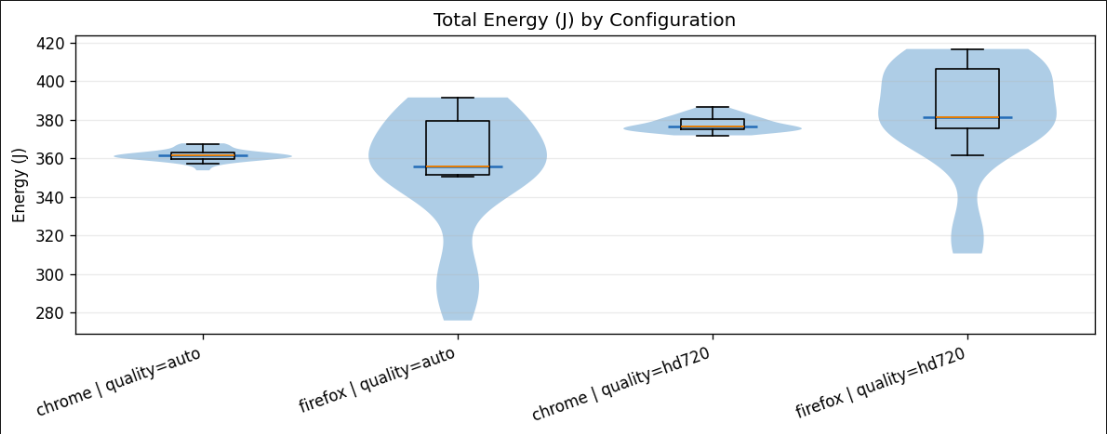
Figure 1: Distribution of total CPU package energy (J).
Chrome exhibits very tight energy distributions in both quality modes, indicating stable and predictable behavior across runs. Firefox, in contrast, shows substantially wider violin plots, particularly under Auto quality.
This suggests that Firefox is more sensitive to transient effects such as adaptive bitrate decisions, buffering behavior, or scheduling variability. While its mean energy may be competitive, individual runs can be significantly more expensive, which is undesirable from an efficiency and predictability standpoint.
Energy vs playback duration
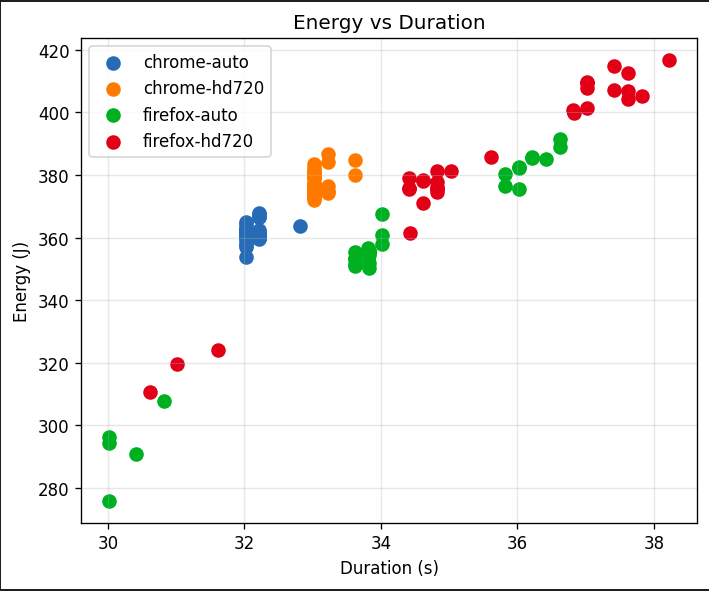
Figure 2: Energy consumption versus runtime.
Chrome runs cluster tightly around 32–33 seconds, while Firefox runs exhibit a much larger spread, with some executions extending beyond 36–38 seconds. Since energy increases approximately linearly with runtime, this duration variability directly explains Firefox’s wider energy distribution.
Power behavior over time
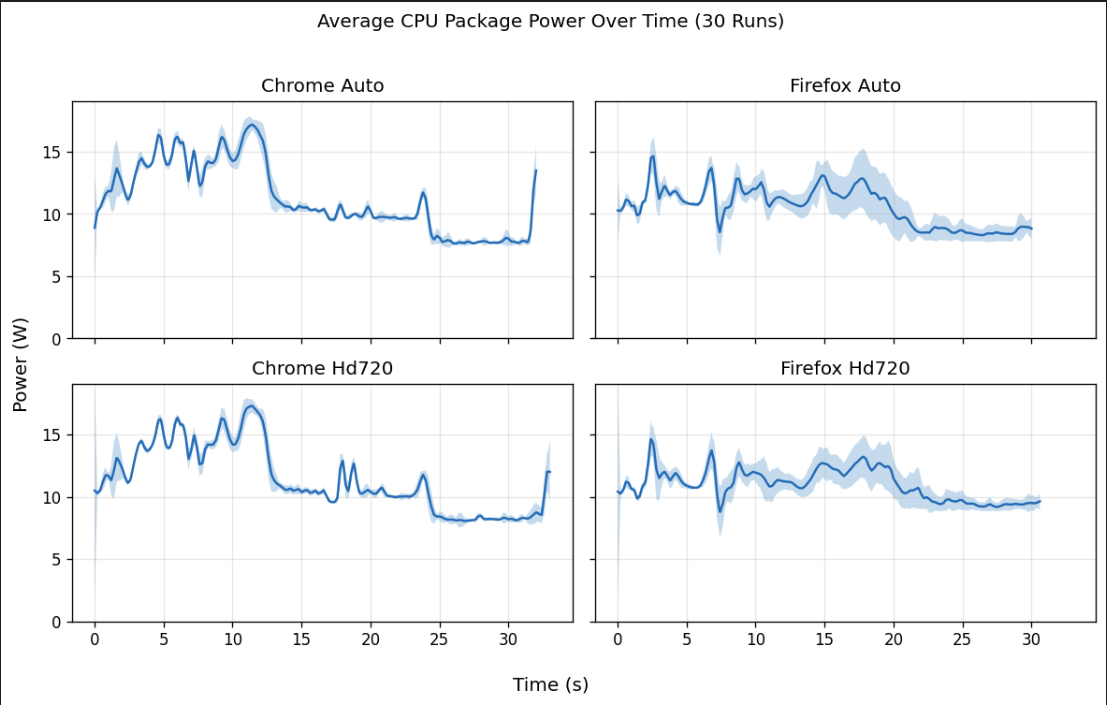
Figure 3: Average CPU package power over time (30-run average).
Chrome shows a pronounced initial power burst during startup, followed by a lower, stable power phase. Firefox exhibits a smoother but more sustained power draw across playback.
This sustained load explains why Firefox can consume more total energy despite lower peak power. Forcing HD720 increases sustained power in both browsers, accounting for the consistent energy increase observed earlier.
Statistical Validation
To assess whether the observed energy differences are statistically meaningful, we first test the assumption of normality using the Shapiro–Wilk test for each browser–quality group. The results show that while Chrome energy measurements are approximately normally distributed, both Firefox configurations significantly deviate from normality (p < 0.01).
Because normality cannot be assumed consistently across groups, we rely on the non-parametric Mann–Whitney U test for all comparisons.
When pooling data across browsers, the comparison between Auto and HD720 playback reveals a highly significant difference in energy consumption (p ≈ 4.4 × 10⁻¹¹), confirming that forcing higher video quality leads to increased energy usage.
Comparing browsers across quality settings yields a more nuanced result. Under Auto quality, the difference between Chrome and Firefox is not statistically significant (p = 0.137), largely due to Firefox’s high variance. Under HD720, however, the difference becomes statistically significant (p = 0.031), indicating that browser choice has a measurable impact on energy consumption when higher quality is enforced.
Overall, these statistical tests confirm that the observed trends are not due to random fluctuations, and that video quality and browser choice both play a systematic role in energy consumption during short-form video playback.
| Comparison | Test | p-value | Interpretation |
|---|---|---|---|
| Auto vs HD720 | Mann–Whitney U | 4.4 × 10⁻¹¹ | Significant |
| Chrome vs Firefox (Auto) | Mann–Whitney U | 0.137 | Not significant |
| Chrome vs Firefox (HD720) | Mann–Whitney U | 0.031 | Significant |
Discussion
Two key effects emerge from the results.
First, forcing HD720 consistently increases energy consumption on both browsers. Power analysis shows that this increase is driven by sustained higher load rather than brief spikes, making quality selection an energy-relevant choice even for short videos.
Second, browser implementation strongly affects consistency. Chrome executes the workload in a highly predictable manner, while Firefox exhibits substantial variability in both runtime and energy. This suggests differences in how browser engines manage decoding, buffering, and task scheduling under short, bursty workloads.
Although the energy cost of a single short video is small, these differences scale with repeated use and massive user populations, making them relevant from a sustainability perspective.
Implications
At the user level, the results show that everyday, seemingly minor choices, such as forcing a higher playback quality or switching browsers, can influence energy consumption even for short, casual interactions like watching a YouTube Short. While users typically optimize for visual quality or smoothness, these results suggest that default settings and browser choice also play a role in energy efficiency. Making energy costs more visible or better aligned with default behaviors could help users make more sustainable choices without sacrificing usability.
At the browser level, the contrast between Chrome’s consistency and Firefox’s higher variance highlights that energy efficiency is not only about average consumption, but also about predictability. Highly variable energy behavior can lead to disproportionately expensive runs, which is undesirable at scale. Browser vendors may therefore benefit from treating energy stability as a first-class optimization goal alongside performance and correctness, particularly for short, bursty workloads such as short-form video playback.
At the platform and ecosystem level, the consistent increase in energy consumption when forcing higher video quality suggests that adaptive quality mechanisms are not only beneficial for buffering and performance, but also for energy efficiency. Platform-level decisions about default quality heuristics can therefore have a meaningful impact on aggregate energy usage when applied across millions of users and billions of video views.
Limitations
As with any controlled experiment, this study has several limitations that should be considered when interpreting the results. First, all measurements are conducted on a single machine under a specific hardware and software configuration. Energy consumption patterns may differ on other systems, particularly on mobile devices or systems with discrete GPUs.
Second, the analysis focuses exclusively on CPU package-level energy consumption. While this captures a substantial portion of the workload involved in browser-based video playback, it does not account for energy usage by other components such as the display, GPU, or network interface. As a result, the reported values should be interpreted as relative comparisons rather than absolute system-wide energy costs.
Third, the experiment uses a single YouTube Short video. Although this allows for a controlled and repeatable workload, different content characteristics: such as motion complexity or encoding format, may influence energy consumption differently. Future work could extend this analysis to a broader set of videos and playback scenarios.
Furthermore, there are two more limitations that become apparent during the workload execution. First, the “Auto” quality setting relies on a proprietary algorithm. Therefore, we cannot definitively tell which resolutions we are comparing against the HD720 baseline. Second, there is a discrepancy in total execution duration between the two browsers. While the YouTube Short itself has a fixed length, Firefox runs took longer to complete compared to Chrome. This extended runtime is likely driven by slower initial buffering, delayed DOM event firing, or another Firefox overhead.
Finally, while automation and repeated measurements reduce noise and improve consistency, real-world usage inevitably involves additional variability, including background applications, user interaction, and fluctuating network conditions. These factors are intentionally minimized here to isolate the effects of browser and quality settings.
Conclusion
This project set out to answer a simple but practical question: do everyday software choices (such as browser selection and video quality settings) have a measurable impact on energy consumption during short-form video playback? Our results show that they do.
Under controlled experimental conditions, we find that forcing higher video quality (720p) consistently increases energy consumption on both browsers. Browser choice further influences not only average energy usage, but also the stability and predictability of playback, with Chrome exhibiting more consistent behavior across runs and Firefox showing substantially higher variability. These effects arise primarily from sustained differences in power draw rather than from isolated performance spikes.
While the energy cost of playing a single YouTube Short is small, short-form content is consumed repeatedly and at massive scale. When aggregated across millions of users and daily interactions, even modest per-play differences become relevant from a sustainability perspective.
More broadly, this study highlights the importance of energy-aware software evaluation. Consumer software is typically optimized for performance and visual quality, while energy consumption remains largely invisible to users. Treating energy as a first-class metric (both in software design and in user-facing defaults), can help reduce the environmental footprint of widely used digital services.
As short-form video continues to dominate online media consumption, understanding and optimizing its energy cost will become increasingly important. Small efficiency improvements, when applied at scale, have the potential to produce meaningful environmental benefits.
Link to the repository
https://github.com/uddhav-pisharody/p1-energy-video-analysis
Back to all projects