Comparing the Energy Consumption of Single-Threaded and Multi-Threaded Programs
Maksym Ziemlewski, Frederik van der Els, Piotr Kranendonk.
Group 12.
Many tasks lend themselves for parallel programming, which can speed up the execution time of the program. Common ways to achieve this is by using multiple threads, and splitting the task into smaller tasks that can be executed in parallel on the different threads. While this indeed can speed up the execution time, it is very much possible that the overhead of multiple threads increases the energy consumption significantly. That is, despite the program being more efficient (taking less time), it could become more energy consuming. Our project would compare single-threaded and multi-threaded implementations of the same app. We will investigate how the number of threads used affects energy consumption, and what conclusions the developer should draw based on that.
Introduction
Most programs are initially written in a single-threaded fashion. A single-threaded program has only one thread of execution. This means that the program performs one execution at a time, in a sequential manner. This makes developing, debugging and maintaining the program simple, as the program as a whole is easier to reason about. However, many modern operating systems have multi-core processors, which have the capability of executing many tasks in parallel. With single-threaded programs, most of these cores are left unused. This can become especially noticeable if blocking requests are involved, where the execution of the entire program is halted until a task finishes.
A common solution to this program is to make the program multi-threaded. Multi-threaded programs run tasks concurrently, or in parallel. Each thread executes its own execution path of the program, allowing the program to execute multiple tasks at a time. Now, a blocking request could be executed on a different thread, allowing to program to continue execution without having to wait for the request to complete.
With many cores being available on modern operating systems, this paradigm becomes increasingly common. The increased efficiency of the program’s execution seems like an obvious reason to take advantage of it. However, when making this change, energy consumption is often left out of the equation. In this report, we will investigate how single-threaded and multi-threaded programs compare in energy consumption, and what considerations a developer should take in mind when choosing between the two paradigms.
More specifically, we will investigate how the memory usage of the same program differs given a single-threaded and multi-threaded implementation. For this, we will take into account the overhead of creating a thread, the number of threads used and the effect of reusing threads.
All the code and scripts used is available in the following repository: github.com/xpple/CS4575p1-code. We will refer to excerpts from this repository in our report.
Methodology
We will use Java as testing language. Java has APIs available that allows us to easily configure the number of threads and whether threads are reused. Furthermore, in Java threads are OS threads, which is what we want to measure. Languages like Go have coroutines that are lightweight versions of threads, which are managed by the Go runtime and not the OS. Because these threads barely have any overhead, they are less interesting to study.
We will measure the energy consumption using EnergiBridge1,2. EnergiBridge is a cross-platform energy measurement utility which internally uses LibreHardwareMonitor3 to measure the energy consumption of a program. EnergiBridge is designed to support multiple operating systems and processor brands, which makes it not only easy to use, but also easy to compare different hardware setups. EnergiBridge can be used from the command line. For example, to measure the energy usage of visiting google.com using Google Chrome for ten seconds, one can use the following command:
energibridge -m 10 -- google-chrome google.com
For a more detailed usage guide, see the GitHub page.
To aid the reproducibility of our results, we will abstract away the usage of EnergiBridge in PowerShell scripts. Because EnergiBridge requires elevated permissions, the scripts will automatically trigger a User Account Control (UAC) prompt that asks for the required permissions. Because running a PowerShell script with elevated permissions carries some risk, the reader is invited to audit the scripts first.
Because multi-threaded programs draw more power simultaneously, one should measure the total energy consumption across all processors. Luckily, this is what LibreHardwareMonitor does; it measures the energy/power sensors at the package level. Here package level refers to the entire physical CPU chip. Thus, because the energy measurements are tied to hardware sensors, they automatically include all active threads running on all cores.
However, because all cores are always measured, there will be a significant amount of background noise that will be captured in the measurements. Therefore, to make our measurements as accurate as possible, one must eliminate as many sources of background energy consumption as possible, and only measure the energy consumption as a consequence of executing the program. For this, we will first perform a null-measurement, which will measure the energy consumption of the system when nothing is being done. On Windows, the timeout command sleeps (in contrast to busy waiting) for an amount of time. The null_measurement.ps1 script measuresures sleeping for ten seconds for a total of thirty iterations.
./scripts/null_measurement.ps1
See the Hardware setup section for the hardware specifications and configurations of the device that was used for performing the measurements.
To reduce variance, each specific measurement will be performed thirty times. Additionally, between each measurement, there is a configurable pause that allows the processor to cool down.
In the next section we will discuss in more detail what particular program we used for measuring energy consumption.
Implementation
To measure the differences in energy consumption, we will use a task that conforms to the following criteria:
- It should be CPU-intensive. This ensures that the observed energy consumption comes as much as possible from the task that is being performed, and not from other sources.
- It should not be able to be optimized away entirely. Even though
javacwill mostly give a faithful translation of the source code into bytecode, the just-in-time (JIT) compiler can choose not to execute the task as long as the meaning of the program is preserved. - It should be deterministic. Each iteration of the task should in theory perform the same operations (subject to nondeterministic ways in which the JIT optimizes code). This ensures the measurements are reproducible.
- It should take a significant amount of time. Short-lived tasks can be hard to distinguish from background noise.
- It should be self-contained. It should for instance not depend on I/O, which has little to do with the CPU but rather with other subsystems.
We found a good candidate for this to be hashing computations. More specifically, we used SHA512, which is the 512 bit digest implementation of the SHA-2 algorithm. Hash functions in general conform to most of the above criteria, and SHA-2 is sufficiently complicated so that it cannot be optimized away. To use it in Java, the Google Guava library4 exposes various hash functions with a convenient API for hashing many Java variable types directly. Because SHA-2 is relatively fast, we will compute the hash iteratively. To ensure the task is not optimized away, the result of each iteration is collected in a sink variable. Below is the code for the task:
Note that the task itself is a completely sequential task, there is no parallelism involved. We will however run this task many times, which is where we can employ multi-threading. In the single-threaded implementation, the task is executed in a for-loop sequentially for a given iteration count. Again, to ensure the task is not optimized away, a sink variable is used. The code for the single-threaded implementation is given below:
Now, we will distinguish two multi-threaded implementations. In the first, threads are not reused. That is, when a certain thread has completed its calculations, it is destroyed. Then, if a new calculation is available to be performed, a new thread will be created. This implementation aims to investigate the energy consumption of the overhead of creating OS threads. In Java, one can accomplish this model by creating a ThreadPoolExecutor whose thread pool size is zero. The code is given below:
The other multi-threaded implementation does reuse threads. This means that if a calculation is finished, the thread will be kept alive until a new calculation is available to be executed, after which the thread will perform the calculations. This gets almost completely rid of the overhead of creating threads, as only the initially used threads have to be created, whereafter the threads are always reused. In Java, such a model can be created using Executors#newFixedThreadPool. The code for this implementation is given below:
MultiThreadedCachedProgram.java
Each different implementation can be invoked with certain parameters. The below table shows the available parameters for each program:
| Program | Arguments |
|---|---|
SINGLE_THREADED |
<input size> |
MULTI_THREADED |
<input size> <num threads> |
MULTI_THREADED_CACHED |
<input size> <num threads> |
For each program the input size determines the number of tasks that will be performed. For the multi-threaded implementations, the second parameter determines the (maximum) number of threads that will be used. The shell of the Java app is given below:
The different programs can be tested using the program_measurement.ps1 script:
./scripts/program_measurement.ps1 <arguments>
Hardware setup
To be able to ensure that the measurements are consistent and reproducible some precautions had to be taken. Most importantly all the collected measurements were made on the same device, as using only one device makes it easier to have a consistent setup. In our case, the device that was used to perform the measurements has the following specifications:
- the operating system is Windows 11;
- the CPU is an Intel Core i7-12700H;
- the installed physical memory (RAM) is 16 GB;
- the resolution is 1920 x 1080, with a refresh rate of 60 hertz.
Additionally the following criteria and configuration settings were used when performing the measurements:
- the device is disconnected from the internet;
- Bluetooth is turned off;
- no external devices are connected (eg., USB-drives, computer mouse, external displays, etc.);
- the device is connected to a power supply;
- the brightness of the device is set to the maximum and is not dynamic;
- screen timeouts are turned off (the device should not enter sleep mode while collecting measurements);
- all applications are closed such that they do not keep on running in the background;
- unnecessary services running in the background are stopped (e.g., web server, file sharing, etc.);
- only a PowerShell is opened that is used to run the scripts for the measurements.
Besides the setting of the device itself the environment can also have an impact on the performance. Therefore some addition thing had to be ensured like:
- the temperature of the room is consistent somewhere around 20 degrees Celsius;
- make sure the room is big, such that the device will not raise the room temperature;
- the laptop is placed in the shadows, such that the sun will not heat it up;
- there are no external heating or cooling devices close enough to the device to have an influence.
After ensuring that all the above-mentioned conditions were met, the scripts to make the measurements were ready to be run.
Results
After running all the tests we found that running the MULTI_THREADEDsetting without caching the threads did not make any difference compared to the SINGLE_THREADEDsetting for all of the tested thread amounts. This shows that having to recreate threads is very expensive and does not improve behavior in any way. The MULTI_THREADED_CACHED settng on the other hand did results in some meaningfull data. All plots and analysis from now on will therefor only be for the cached variant of the tests.
Using the collected data the following plots can be created:
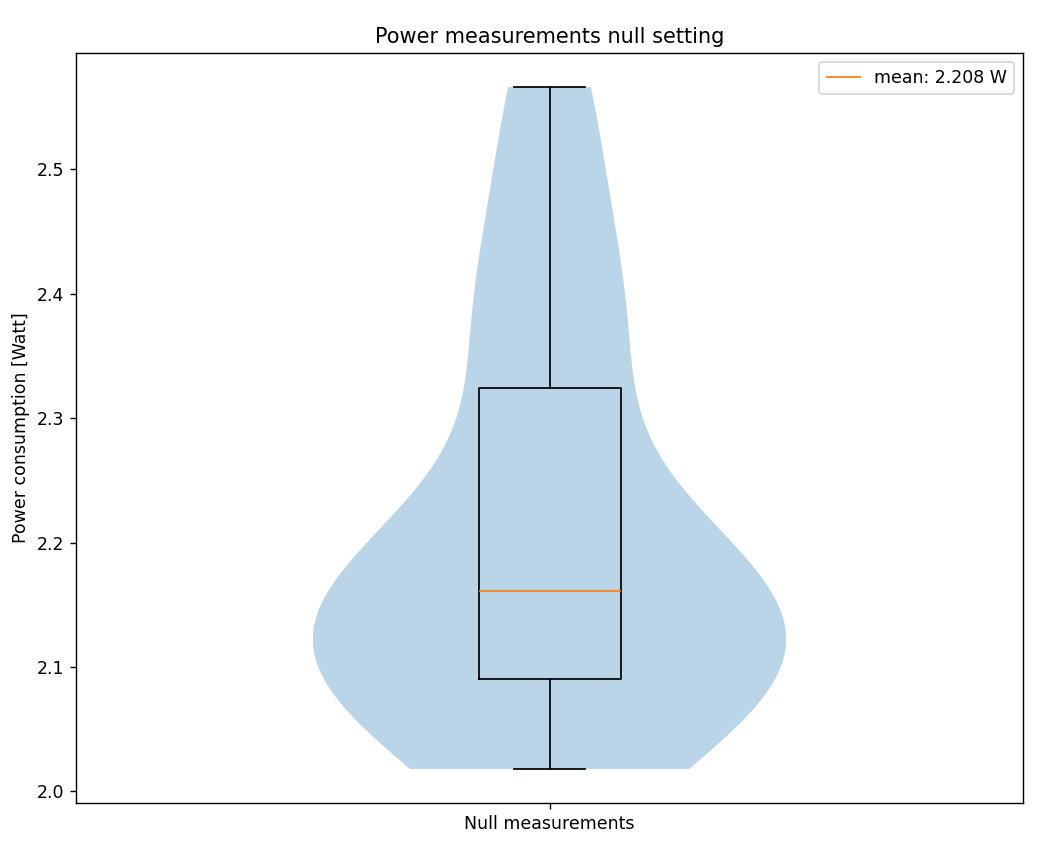
The first plot shows the average power consumption for the null measurements. The mean power over 28 runs (2 were left out as outliers) shows that the device uses around 2.2 W when in an idle state.
This second plot shows the programs total energy consumption in Joules, for each experiment with different amounts of threads. For each experiment around 0 to 3 measurements were labeled as outliers and were left out from this plot. As already mentioned using more threads for computations also speeds up the process. To still be able to compare the experiments, we want to isolate the energy consumption of the program itself. To do this we subtract the found background power consumption (2.2 W) multiplied by the time it took each measurement to run: $J_{program} = J_{total} - P_{null} * \Delta t$
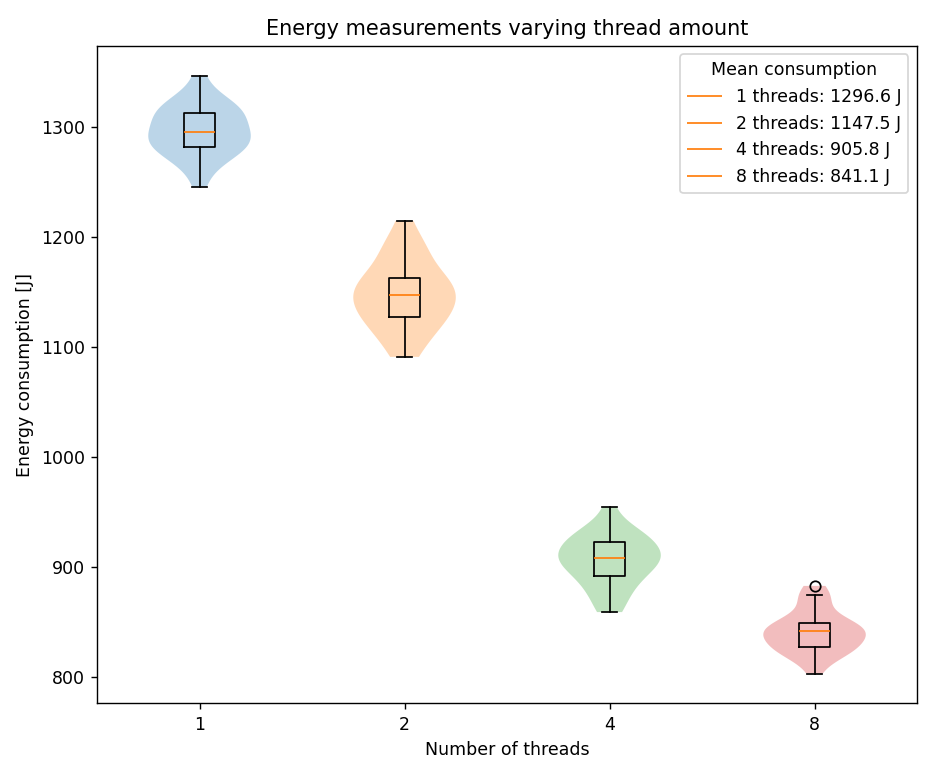
Interestingly using more threads clearly reduces the total energy consumption. This means that parallelizing a program will not only speed up the run time, but can also reduce the total energy it will consume. We however have to keep in mind that this does not mean that the program draws less power. On the contrary, the third plot shows that using more threads increases the power usage of the program:
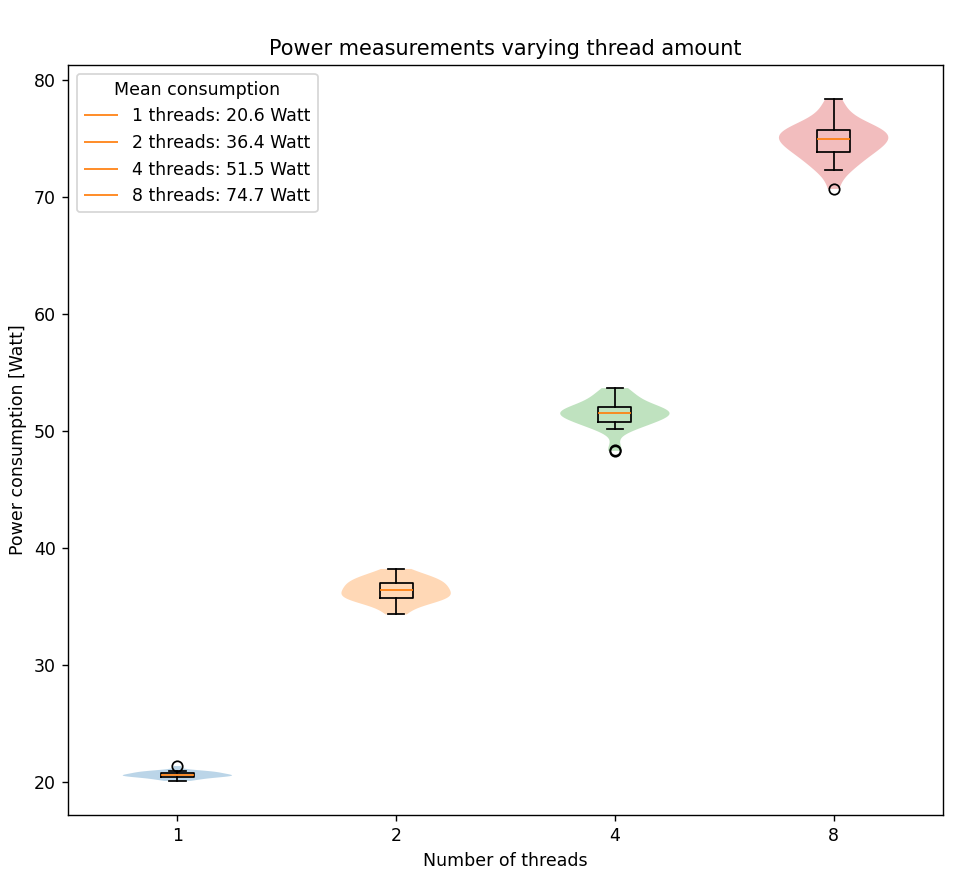
This indicates that when continuously running a multi-threaded program as opposed a single threaded program, will use a lot more energy. Only when running the program a (small) finite amount of times it will be beneficial for the energy consumption to use multiple threads compared to a single one.
Statistical analysis of the results
Normality testing
Before choosing our statistical tests, we first check whether the data from each configuration follows a normal distribution. For this, we use the Shapiro-Wilk test. Under the null hypothesis, the data is normally distributed; we reject normality at a significance level of α = 0.05.
| Configuration | Shapiro-Wilk p-value | Normal? |
|---|---|---|
| null | 0.00176 | No |
| threads_1 | 0.9999 | Yes |
| threads_2 | 0.95544 | Yes |
| threads_4 | 0.86007 | Yes |
| threads_8 | 0.49363 | Yes |
The null measurement does not follow a normal distribution (p = 0.00176 < 0.05). This is expected: idle energy consumption is influenced by background activity, which introduces irregular spikes.
All thread configurations are clearly normally distributed (all p-values well above 0.05). This allows us to use parametric tests for comparison.
Descriptive statistics
| Configuration | Mean (J) | Std. dev. (J) | Relative to 1 thread |
|---|---|---|---|
| threads_1 | 1296.574 | 22.389 | baseline |
| threads_2 | 1147.454 | 30.183 | −11.5% |
| threads_4 | 905.818 | 22.795 | −30.1% |
| threads_8 | 841.099 | 18.767 | −35.1% |
A trend shows that energy consumption decreases as the number of threads increases. Going from 1 to 2 threads already saves about 149 J per run (11.5%), and doubling again to 4 threads saves a further 242 J. The jump from 4 to 8 threads, however, only gives an additional 65 J savings (a 7.1% reduction from 4 threads). This suggests smaller returns as more threads are added.
Effect size (Cohen’s d)
Because all thread configurations are normally distributed, we compute Cohen’s d to quantify how strongly the distributions differ. Cohen’s d is the difference in means divided by the pooled standard deviation. By convention, d = 0.2 is considered small, d = 0.5 medium, and d = 0.8 large.
| Comparison | Mean diff. (J) | Pooled SD (J) | Cohen’s d |
|---|---|---|---|
| 1 thread vs. 2 threads | 149.12 | 26.57 | 5.61 |
| 1 thread vs. 4 threads | 390.76 | 22.59 | 17.30 |
| 1 thread vs. 8 threads | 455.48 | 20.66 | 22.05 |
| 4 threads vs. 8 threads | 64.72 | 20.88 | 3.10 |
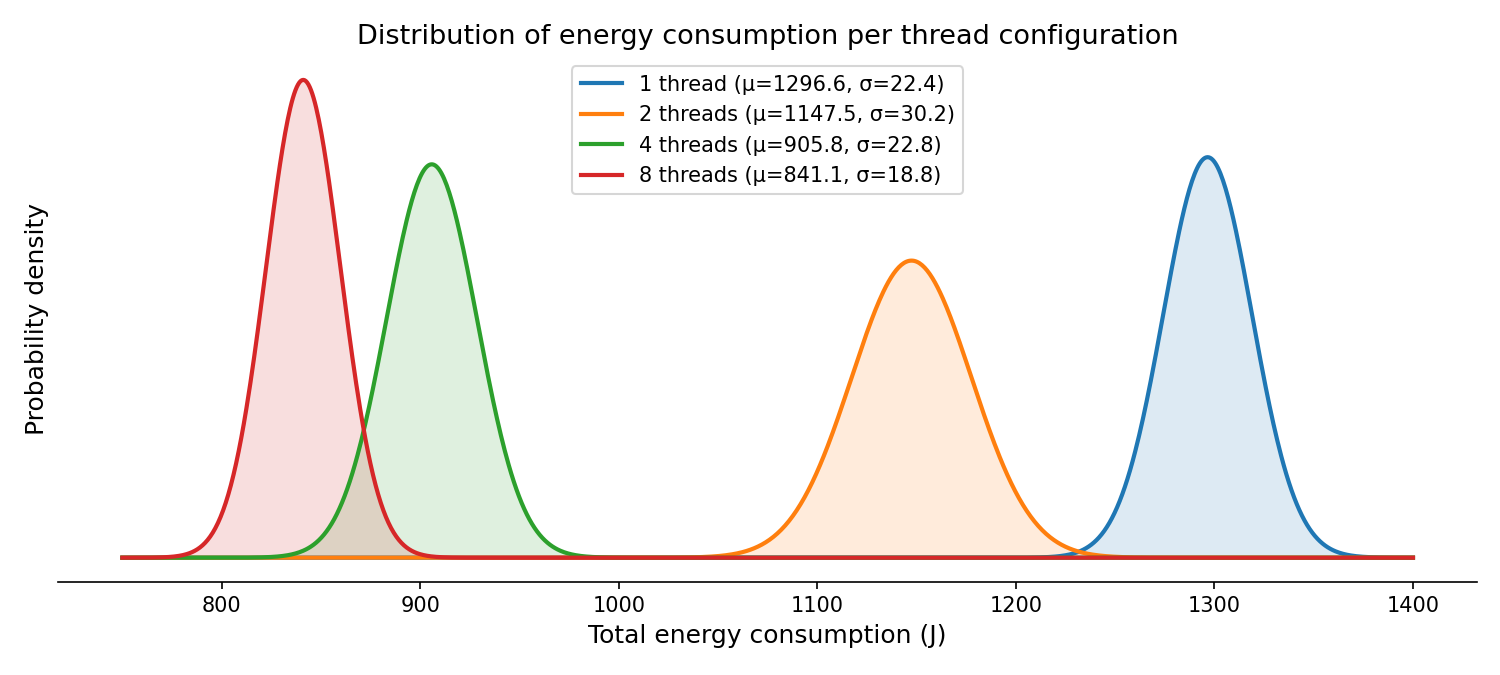
All effect sizes are far above the “large” threshold (d > 0.8), meaning the differences are statistically significant. The distributions barely overlap at all. Even the smallest comparison (4 vs. 8 threads) has d = 3.10, which means the two groups are clearly separated. The figure below visualizes this: the fitted normal curves for each configuration are plotted using the measured means and standard deviations.
Practical significance
A single run of the workload on 1 thread uses about 1297 J. On 8 threads, that drops to 841 J, which is a saving of roughly 456 J per execution. Over a year, that adds up to about 4.6 kWh per machine assuming 100 workloads a day. For a server consisting of many machines processing thousands of such tasks daily, the cumulative savings become meaningful both in cost and in carbon footprint.
It is worth noticing, that these savings come from a CPU-heavy hashing workload where parallelism directly reduces total execution time. In workloads that are I/O-bound, memory-bound, or that have heavy synchronization overhead, the energy savings from threading could be smaller. Our results should not be generalized to all workloads without further investigation.
Diminishing returns
The data shows clear diminishing returns. Doubling from 1 to 2 threads saves 149 J; from 2 to 4 saves 242 J (the biggest absolute gain); from 4 to 8 saves only 65 J. The marginal gain per additional thread decreases sharply at higher thread counts. This is consistent with Amdahl’s law: as more threads are added, the inherently sequential portions of the program (thread creation, task dispatch, result aggregation) become the bottleneck. At some point, adding more threads will stop helping — and may even hurt due to increased context switching and contention.
Limitations
A few limitations should be noted:
- We only tested one workload (SHA-512 hashing). Different workloads may behave differently under threading. Testing additional workloads was outside the time scope of this project.
- We did not test thread counts beyond 8 (because of hardware limitation), which means we cannot say where the optimal number of threads lies for this specific workload and hardware.
- The measurements were performed on a single machine. Hardware differences will affect the results. We mitigated this by strictly controlling the environment (see Hardware setup), but access to additional machines was not available.
Conclusion and future work
For a CPU-bound workload, multi-threading reduces total energy consumption, up to 35% with 8 threads compared to a single thread. The effect sizes are very large (Cohen’s d ≥ 3.10), confirming these are reliable differences. However, the gains diminish: most of the benefit is captured by 4 threads, and doubling further to 8 adds only a modest improvement. In high-throughput settings (servers, batch processing), the cumulative savings are practically significant. For developers, this means multi-threading is not only a performance tool, but also an energy tradeoff.
Several directions could extend this work:
- More thread counts. We tested 1, 2, 4, and 8 threads. Testing 16, 32, and beyond would help identify the trend better.
- Different workloads. The SHA-512 hashing task is purely CPU-bound. Studying I/O-bound, memory-bound, or mixed workloads would show whether the energy benefit of multi-threading holds across different types of computation.
- Execution time vs. energy trade-off. While we focused on total energy, a combined analysis of execution time and energy (e.g., energy-delay product) would provide a more complete picture for decision-making in performance-sensitive contexts.
References
-
Sallou, J., Cruz, L., & Durieux, T. (2023). EnergiBridge: Empowering software sustainability through cross-platform energy measurement. arXiv. https://doi.org/10.48550/arXiv.2312.13897 ↩
-
Durieux, T. (n.d.). EnergiBridge. GitHub. https://github.com/tdurieux/EnergiBridge ↩
-
LibreHardwareMonitor. (n.d.). LibreHardwareMonitor. GitHub. https://github.com/LibreHardwareMonitor/LibreHardwareMonitor ↩
-
Google. (n.d.). Guava: Google core libraries for Java. https://guava.dev/ ↩